> homelab · build 03
Knowing When Something Breaks
Uptime Kuma watches every service in my lab and alerts my phone. Then I broke one on purpose to prove it works.
My lab now runs remote access (Tailscale) and DNS for the whole house (AdGuard). The next question was obvious: how do I find out when one of them breaks, before the house does? That's what Uptime Kuma is for.
What it does
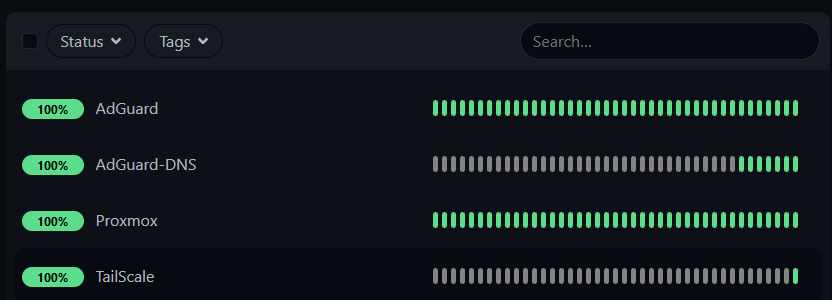
Uptime Kuma is a free, open-source monitoring tool. Every 30 seconds it checks each service: does the web page load, does the machine answer a ping, does the DNS server actually return an answer. It keeps a history of every check, and when something changes state it sends a message to my phone through a Telegram bot.
Why it's worth running
- I find out first. An outage reaches my phone in under a minute, not hours later when a page won't load. In SOC terms, it shrinks the time to detect.
- It covers my weakest spot. Every device in the house depends on AdGuard for DNS. Now something is watching it.
- It keeps evidence. Uptime and response-time history answer "when did this start?" without guessing.
- It's small. One CPU core, 1 GB of RAM, a 4 GB disk.
- The skill transfers. It works on the same ideas as enterprise tools like Nagios or Datadog: define checks, set thresholds, route alerts.
Two decisions that mattered
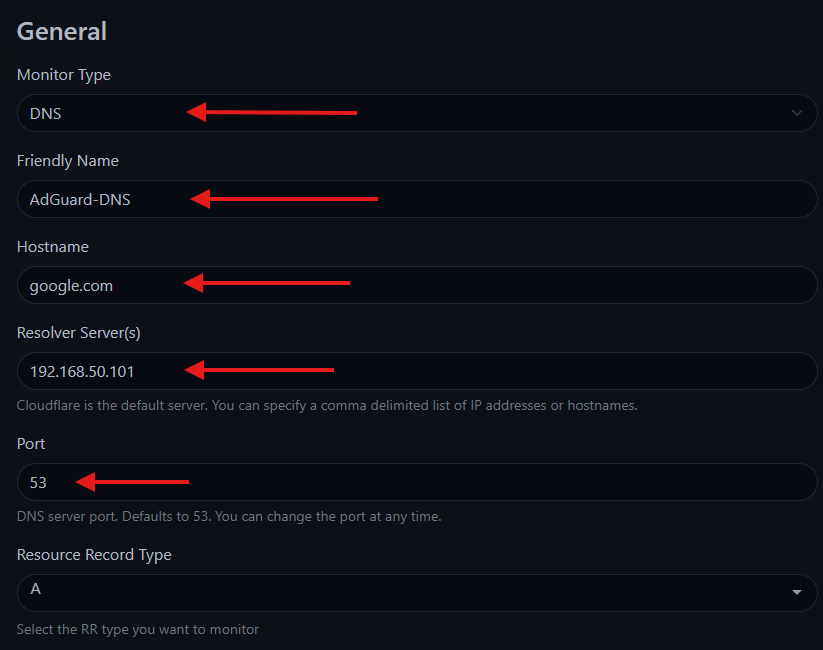
- The monitor doesn't depend on what it monitors. If Uptime Kuma used AdGuard for DNS and AdGuard went down, it couldn't reach Telegram to tell me. So it uses a public DNS server instead, and the alert can always get out.
- Check the thing people actually use. AdGuard's admin page loading doesn't mean DNS is working. The most important monitor asks AdGuard to resolve a real domain.
Proving it: breaking a service on purpose
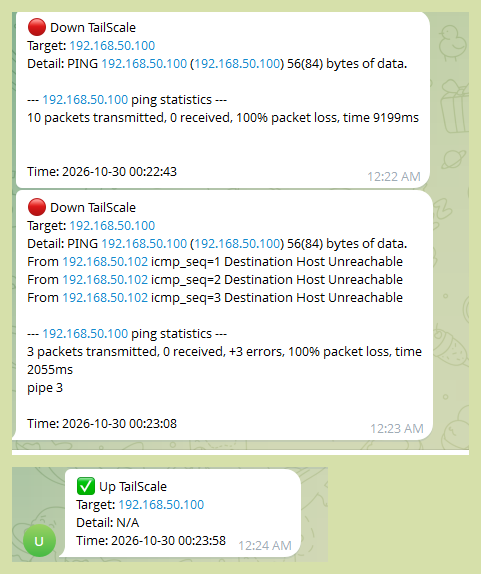
A monitor you've never seen fail is one you're trusting blindly. So I stopped my Tailscale container from the Proxmox shell. The Down alert reached my phone. I started it again, and the Up alert followed.
What I took away
- Gateway routes, DNS resolves. I briefly mixed them up during setup. Pointing the gateway at a DNS server would have cut the container off from the internet.
- Check that every monitor has an alert attached. My first two monitors existed before I set up Telegram, so they would have failed silently until I attached it.
- Test with a real failure. A test button proves the bot works. Only an actual outage proves the whole chain.
The full walkthrough, every setting explained and every screenshot are on GitHub.
Read the full write-up →